Wednesday, 4 June 2014

Assistive Technology for Individuals Who Are Deaf

High Tech


CPC-500 VoiceCaptioner
The CPC-500 VoiceCaptioner is a captioning software system designed to convert speech into text for individuals who are deaf or hard of hearing. This software is designed to work with a speech recognition program such as Dragon NaturallySpeaking or ViaVoice (not included, see separate entries). A computer is connected via a serial cable to a closed caption encoder that receives a video feed of the speaker. The speaker's words are automatically turned into captions. Captioning of multiple speakers is also possible. This captioning system can be used in classrooms, meetings and for broadcasting television programs. This device would be useful for any persons who are working in areas which require them to respond immediately to conversations, meetings, or to use at home for communicating with friends and family.
Price: 1995.00.


iPad


A device like the iPad has really opened up the communication world to individuals who are Deaf. A quick and easy way to communicate is through text messaging. Another way to communicate is text to speech. For those users who are younger they can use Apps like Proloquo2go to communicate. There are also Apps like iASL that translate up to five words into American Sign Language. The one challenge with that App is that the user needs to be somewhat fluent in signing


Medium Tech


CapTel 840 Captioned Telephone
The CapTel 840 is a captioned telephone for people with hearing disabilities. This phone is designed specifically to interact with the CapTel Captioning Service to display a realtime transcript of each conversation on a screen located just above the number key pad. Users who subscribe to the CapTel Captioning Service place each call in the same way as dialing a traditional phone. As the user dials an outgoing call, the phone automatically connects to the Captioning Service. When the other party answers, the CapTel 840 user hears everything said as with a traditional call. Behind the scenes, an operator at the CapTel Captioning Service transcribes everything the other party says into written text. The written text appears on the display window built into the CapTel 840. The captions appear almost simultaneously with the spoken word, allowing the user to understand everything that is said by hearing and/or reading it. The telephone does not, by itself, translate spoken words into written captions, and the captioning feature can only be used for calls that go through the CapTel Captioning Service. The phone can also be used as a traditional amplified telephone, without the caption feature. This device can be used in the home for persons who require captioning to utilize phone services. It would not be beneficial to people who do not have the Captel Captioning services available in their area.
Price: 495.00 to 99.00.


Closed Captioning

Closed Captioning allows individuals who are Deaf to follow the dialogue on television and movies. This allows the entire audience to receive the same information. A challenge could be that some video content may not have Closed Captioning.


Low Tech


Clarity AlertMaster AL10
The Clarity AlertMaster AL10 is an all-in-one signal system designed to alert individuals who are deaf or hard of hearing to environmental sounds. The system uses a flashing lamp, bed shaker, and a panel of lights to alert the user(s) to different sounds, including a telephone ring, a doorbell, audio alarm devices, an alarm clock, a baby cry, someone entering the home, and loud room noises such as a smoke detector. The system features a wireless receiver which can be purchased separately, a 3.5-inch clock display, adjustable display brightness, and dual power backup that keeps the system running when the power is out. The system includes a base unit, a bed shaker with cord, a doorbell transmitter, and a personal page switch. OPTIONS: An audio alarm transmitter, a baby sound monitor, a door announcer, a personal signaler, and a motion sensor. POWER: Uses standard 120 volt power outlet, and has a rechargeable battery backup. This device would be useful for someone who is living alone or who may need the assistance when occupied in their home.
Price: 179.95.


Boardmaker

Boardmaker is a low tech option for students who are Deaf. It allows the user to communicate by pointing at pictures. A benefit of Boardmaker is that it can be individualized. A challenge would be that the user would not be able to communicate as quickly as they would be able to using a device that is high tech. 


Deaffinity - Deaf Awareness 2012


Deaf School Demo - Students first "hands on" with the iPad


Fast Food Friday!


Fast Food Friday! 

First I would need to know which drive thru it is, which means I would either have to know the symbol, or read the sign, which would require me to have the ability of sight. Then I would need to either read the menu sign or have the person at the window tell me what the menu consisted of, what types of burgers they sold. I could either decide from the choices given, or I could speak to them and let them know my preferences. I would need to know how to speak the language understood by the employee, if it was at a local location I would assume they spoke english, but if they didn't I might have difficulty making my order. Once I have decided which burger I would like to order I would let the employee know in a clear concise voice so that my order can be processed. I would then need to know the value of money and count out the right amount, or choose an amount that I think would cover the cost of the burger. I would then pass it to the person at the window and then wait for my order to be passed out.  

Wednesday, 28 May 2014

Communication


What is communication

Communication is simply the act of transferring information from one place to another. Any act in which a person receives information from another about their needs, wants, thoughts, ideas. Linguistic and non linguistic modes. 


Different ways we communicate
Communication can take many forms such as: speech, a shared glance, text, gestures, facial expressions, touch, sign language, symbols, pictures, speech-generating devices. When children act out or have a melt down it can mean many things such as hunger, frustration, boredom, excitement. 
Spoken or Verbal Communication: face-to-face, telephone, cellphone, radio or television and other media methods such as face time, Skype, messengers.
Non-Verbal Communication: body language, gestures, how we dress or act - even our scent.
Written Communication: letters, e-mails, texts, twitter, facebook, messengers, books, magazines, the Internet or via other media.
Visualizations: graphs, charts, maps, logos, billboards, video screens.


What is AAC (Augmentative and Alternative Communication)?
Augmentative and alternative communication (AAC) includes all forms of communication (other than oral speech) that are used to express thoughts, needs, wants, and ideas. We all use AAC when we make facial expressions or gestures, use symbols or pictures, or write.


Who is a typical user of AAC?
People with severe speech or language problems rely on AAC to supplement existing speech or replace speech that is not functional. AAC is used by those with a wide range of speech and language impairments, including congenital impairments such as cerebral palsy, intellectual impairment and autism, and acquired conditions such as amyotrophic lateral sclerosis and Parkinson's disease.Any person with a disability that makes it difficult for them to communicate may benefit from AAC. Some people need AAC only for a short time; others may use it throughout their lives. AAC allows an individual to express their needs and wants, and more fully participate in decisions that affect their lives.

What is 3 criteria for effective communication
Joint attention is the shared focus of two individuals on an object. It is achieved when one individual alerts another to an object by means of eye glazing, pointing or other verbal or non-verbal indications. An individual gazes at another individual, points to an object and then returns their gaze to the other individual.  (http://en.wikipedia.org/wiki/Joint_attention)

Communication partners should be patient, interested and comfortable with all methods of communication. They should try to understand impaired speech, make an effort to interpret signs and gestures. The should also engage in purposeful conversation rather than yes and no questions.  Communication partners should focus on the person or message rather than the user's technology or technique. (http://www.augcominc.com/newsletters/index.cfm/newsletter_22.pdf)

Common language has to be developed for almost any collaborative project to work. As soon as you have a team, instead of a person, communication becomes the cornerstone of everything you do. Pairing works much better once a common language is developed; without it, two people will sit together, but work independently. Once they develop a common language, a shared understanding, they work together, relying on each other’s strengths and compensating for each other’s weaknesses. That’s when you see the artifacts begin to go away and things get made, instead of just planned. (http://www.christianmanzella.com/complex-or-complicated-the-importance-of-developing-common-language/)


Different types of ACC


Sara Pyszka - DynaVox: Cerebral Palsy AAC Success Story (+playlist)

Wednesday, 21 May 2014

Reading Websites Reading Software Treasure Hunt

READING WEBSITES TREASURE HUNT   

My task for this week was to seek at least 5 websites that offer reading remediation. The ones that I use regularly and are familiar with were Starfall, ABCya, Raz-kids, Red Rocket Readers, and Tumblebooks. Starfall and ABCya are free to use and the students love them, the Raz-kids, Red Rocket Readers, and Tumblebooks require a subscription, they do provide a free trial and are worth the cost when you consider the benefits students gain by using them in their learning. 

http://www.starfall.com

Starfall.com opened in September of 2002 as a free public service to teach children to read with phonics. The systematic phonics approach, along with the phonemic practice is perfect for younger students, special education students, and English development (ELL, ESL). The method of instruction motivates children in an atmosphere of imagination and enthusiasm and provides opportunities for child-directed instruction. It also supports English language learners and struggling readers alongside their peers. 


http://www.abcya.com

ABCya.com is the leader in free educational kids computer games and activities for elementary students to learn on the web. All children's educational computer activities were created or approved by certified school teachers. All educational games are free and are modeled from primary grade lessons and enhanced to provide an interactive way for children to learn. Grade level lessons incorporate areas such as math and language arts while introducing basic computer skills. Many of the kindergarten and first grade activities are equipped with sound to enhance understanding. 


http://www.raz-kids.com

Raz-kids is an excellent website to use in the classroom, students can access 400+ ebooks and open book quizzes, the quizzes can test comprehension. They can listen to books for modelled fluency, read books for practice and then record themselves so that teachers can monitor their progress. The program offers a variety of genres, as well as language options which are accessible 24/7. This program also helps teachers stay in control, they can make assignments and track their students progress with online assessments and student recordings. 


http://www.redrocketreaders.com

Red Rocket Readers feature colourful, entertaining illustrations and photographs that support the text, launch oral discussion and develop student comprehension. The classic story structure (tension, climax, and resolution) ensures chldren will want to engage with the texts. This online resource helps to develop and ensure the success of reading strategies and enables students to read for enjoyment and information as they access meaning from fiction and non-fiction text.The texts features meaningful concepts and experiences that children an relate to while developing word recognition along with language development. The books focus on increasing knowledge of print conventions, phonological patterns and phonic knowledge in context.  


http://www.tumblebooks.com

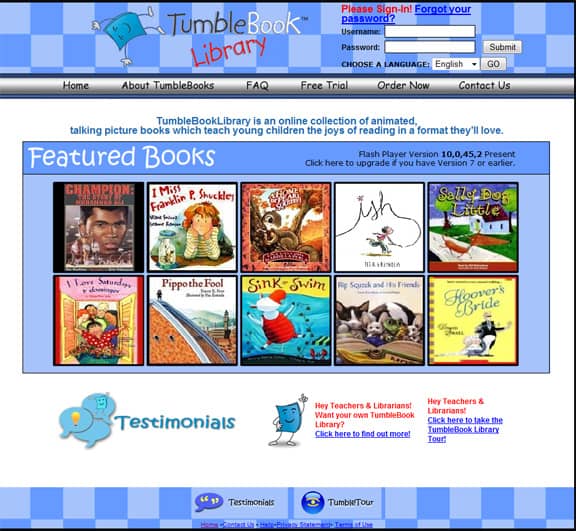
TumbleBooks are animated, talking picture books which teach kids the joy of reading in a format they'll love. TumbleBooks are created by taking existing picture books, adding animation, sound, music and narration to produce an electronic picture book which you can read, or have read to you. The TumblePremium collection has nearly 1000 titles and is perfect for public libraries and elementary schools, with content most appropriate for those in grades K-6. It includes animated talking picture books, chapter books, videos, non-fiction titles, playlists, books in languages other than English such as French and Spanish, graphic novels and math stories. This collection is rich in educational resources such as lesson plans, quizzes, educational games and puzzles related to both math and language skills. The collections also provide enrichment to students who are reading independently with a variety of high interest material. It also provides support to students who require skill building with a variety of exercises that can be matched with other areas of the curriculum.

Reading Software Treasure Hunt

My task for this week was to seek software that offer reading remediation. The ones that I found were Hooked on Phonics, Read180, ClickN Read and Samson's classroom. 

https://www.hookedonphonics.com

The Hooked on Phonics Learn to Read program uses systematic instruction and multisensory materials to help children learn to read. The instructional approach and techniques are based on current research about how children learn to read, and the levels build systematically from letters and sounds, then to words and sentences, and ultimately to reading fluency. The Hooked on Phonics Learn to Read program was developed using research on phonics, phonemic awareness and oral language, alphabetic knowledge, and print awareness. It is based on a learn-practice-read approach, systematic phonics instruction, and multi sensory materials. It is divided into an educational arc that addresses each stage of a child’s reading development and was developed in conjunction with educators, children’s authors, and parents. Hooked on Phonics has been tested by kids, parents, and teachers and designed to build children’s confidence as readers. 


http://read180.scholastic.com

Teachers begin and end each session with Whole-Group Instruction that engages the entire class. In between, students break into groups and rotate through three stations for Small-Group and independent learning. Following the READ 180 Instructional Model is proven to result in significant gains in reading achievement for students after one or two years participation. Teachers begin the class by providing systematic instruction in reading skills and strategies, academic vocabulary, writing, and grammar to the whole class. Students use the adaptive software independently, providing them with individualized practice in reading, spelling, vocabulary, and writing. Teachers end the day with Whole-Group reflection, where students have the opportunity to engage each other with what they have learned.


http://www.clicknkids.com

CNK Digital is a worldwide publisher, developer, and distributor of innovative, engaging, and award-winning digital education experiences for computer, handheld, and mobile platforms. Their mission is to revolutionize the world of digital education by empowering parents and inspiring kids. If kids are given the choice between watching cartoons and learning, it’s easy to guess which one they’ll pick. With their innovative researched based software, they’ll enjoy both. Using animated characters, our educational games help children master a full range of subjects by way of a fun, interactive experience and an easy-to-use interface. Teaching everything from beginning letter sounds to full sentences to story reading. Developed by a nationally recognized research professor in early education, Dr. J. Ron Nelson, ClickN Read® helps any child learn to read correctly through an innovative game-like environment. An on- screen, animated instructor gently guides your child through each lesson. Children get the satisfaction of earning each answer and building the self-esteem that comes with arriving at the right answers. ClickN READ Phonics® is the only reading program available that utilizes this kind of self-motivation. 


http://www.samsonsclassroom.com


Reading with Samson helps students analyze reading material and learn how to draw conclusions and answer questions based on that material. Spelling with Samson is a comprehensive spelling product that has more than 5,000 words and counting. This software captivates students and provides educators with ally he tools they need to improve the spelling ability of their students. Sight words with Samson gives students the necessary foundation they need to become successful readers. This product is proven to help early readers master the 224 most commonly used words in the English language. The statistical tracking tools included with Samson’s Classroom provide you with up to the minute reports on how your students are performing. Drill down in the reports to monitor the progress of a specific student or take a high level view of trends across a class or even an entire grade.


http://www.successforall.org/Elementary/Powerful-Instruction/

Reading Roots 4th Edition is a ninety-minute comprehensive program that targets the needs  of beginning readers. Reading Roots is a research-based beginning-reading program that provides a strong base for successful reading through systematic phonics instruction supported by decodable stories, along with instruction in fluency and comprehension. Reading Roots also fosters students’ love of reading by providing rich literature experiences, extensive oral-language development, and thematically focused writing instruction. These objectives are embedded in a fast-paced, engaging, and highly effective instructional process. Students are assessed and regrouped according to their reading level every quarter to ensure that they receive the most focused instruction.

Reading Wings 4th Edition is a research-based reading curriculum that provides ninety-minute daily lessons over a period of five days and targets the needs of students reading on a second- through sixth-grade level who have successfully learned to decode but need to develop more sophisticated reading skills. To ensure that students become proficient readers, Reading Wings uses Success for All’s core instructional structures to target vocabulary development, reading comprehension, fluency, oral-language development, and written expression by providing students ample opportunities with both narrative and expository text.


I enjoyed watching Todd Rose's Ted Talk "The Myth of Average" during last class, the whole idea that one size does not fit all is true in so many areas, especially the classroom. We were asked to identify the "adjustable seat" in our classrooms. There are many times when I would utilize an adjustable seat. The main area I feel that I use it the most would be throughout our Literacy centres. Our guided reading groups are pretty much tailor-made, they are designed and prepared for each student and fit to accommodate their abilities and strengths. What they know and need to know is what determines our focus of the day. If I had given each student the exact same lesson I would feel as though I was depriving my students of a quality education, they each have individual strengths and needs which need to be utilized and addressed. 
Our school provides resource to many of my students, which varies on their needs, some have been given resource for a short time and then their seat was given to another student who could use the extra focused learning. It has been working well; some of the same students have remained on the resource list, they are improving and have improved since the beginning of this term, however they are still not where they need to be. I am very grateful that they are given the opportunity to receive the extra help because sometimes students just need that extra boost to help them catch on to the curriculum. Just as the one size fits all seat doesn't fit all, the curriculum cannot fit all students immediately, it needs to be adjusted and fitted into their lives, when they are ready to learn and move on. 

Wednesday, 7 May 2014

assistive technology models

5 Assistive Technology Models

Five Assessment Models for the Blog

Assistive Technology Models were designed as a resource to support individuals who need technology to ensure the most appropriate tools were being selected and utilized to improve their areas of need while supporting their strengths.  The AT models all have a comprehensive, systematic process that ensures the best outcome for the individual in need.


The SETT model

·     SETT is an organizational tool to help AT teams gather information to create Student-centered, Environmentally-useful, and Tasks-focused Tool systems that foster the educational success of students with disabilities.

·     SETT is targeted for students with disabilities. 
·     Within the four components (Student, Environment, Tasks, Tools) a series of questions are used to collect information. The first component is the Student; abilities and needs are identified. The second component, Environments, refers both to the physical environments as well as the instructional environments within a classroom. The third component of SETT is Tasks – the activities the student is asked to perform and the barriers to performance. The fourth component is Tools, which include both AT devices and services.
·     An intended outcome is an appropriate match between the student, the environment, the tasks, and the technology used to accomplish tasks within the environment.

·     Video : https://www.youtube.com/watch?v=xDtxMlL1GUY


Each of these components is equally important when making decisions about which technology will be best suited for the person in need in the various environments in which the person will be using it.  Like all the other models, the SETT framework uses questions to help all the team members involved collect pertinent information about the person in need.  This information helps to guide the decisions the team makes about the person and the technology chosen to ensure success within the educational setting. 
More information about the SETT model can be found at the link below.

Education Tech Points Model (ETP)

·     Education Tech Points (ETP) is a tool to help school districts to determine and meet the assistive technology needs of individual students and to evaluate and improve their assistive technology services system wide.
·     It consists of a comprehensive manual that includes information on team-building, components of effective AT service delivery, and systems change.
·     The specifics of this model center around six “Tech Points”. Each Tech Point identifies the specific times within the planning and provision of special education services that the need for AT should be considered.
·     The ETP process has outcomes built in at each Tech Point. The ultimate outcome is that the student receives the AT devices and services needed to access the curriculum and meet IEP/IFSP goals and objectives.


Wisconsin Assistive Technology Initiative (WATI)

·     The purpose of the Wisconsin Assistive Technology Initiative (WATI) is to provide a comprehensive and thorough assistive technology assessment process.
·     The WATI targets school-age children with disabilities and school districts. It provides both the process as well as specific guides relevant to the 10 sections of the model. These include an overview of the AT assessment and planning process, all the forms developed for the WATI model. AT for writing and computer access.  AT for communication addresses three major groups of individuals: the alternative language group, the expressive language group, and the supportive language group. AT for reading, studying, and mathematics are grouped together for adaptations in academic areas.
·     It also provides information on AT for recreation, leisure, and activities of daily living, including environmental control, addresses AT for vision and hearing, AT for positioning and seating comprises, writing AT in the IEP, and  has information on AT laws and funding, including funding sources, legal provisions and policies.
·     The outcomes of the WATI assessment process focus on consideration of AT in the IEP and that the student receives AT devices and services needed to access the curriculum and meet IEP/IFSP goals and objectives.


Matching Person & Technology Model (MPT)

Selecting appropriate technology to meet the individual needs of the person it is intended to support is a big decision.  Many factors need to be taken into consideration including:
·     individual preferences·     users’ hopes of the technology
·     finances
·     family
·     environment in which the technology will be used (school, home or vocational environments) 
To assist individuals with this decision, the Matching Person & Technology (MPT) model has implemented an intense consultation process for all involved.  It utilizes a variety of surveys and questionnaires for home, school, work place and outside agencies to help ensure the most appropriate match between person and technology choice is made.  Small samples of these surveys and questionnaires can be found in the link below.
This is extremely important since this match helps to ensure the technology selected will be successfully implemented and effectively used by the individual for which it is intended.  Hence, careful collaboration between all the parties involved is crucial. 
In addition to the adult version of Matching Person & Technology model, a Matching Assistive Technology to Child (MATCH ) model was designed with the same hope and goal in mind….that appropriate technology would be selected, successfully implemented and effectively used by the child in their various environments.  Similarly, the MATCH assessment process involves a series of surveys and questionnaires to be completed by all team members involved from home, school and outside agencies.   


Lifespace Access Profile Model for Individuals with Severe or Multiple Disabilities (LAP)
Lifespace Access Profile Model was designed to support individuals with severe or multiple disabilities tocarefully select, successfully implement and effectively utilizetechnology to improve their areas of weakness and support their areas of strength.
Like other assistive technology models, the LAP Model has an assessment component that evaluates an individual’s abilities in 5 key areas:
·     physical resources
·     cognitive resources
·     emotional resources
·     support resources
·     environmental analysis
Additional information about the LAP model can be found at the link below.


 Food for Thought
Nick Brown, a man with cerebral palsy has a wonderful story of how technology has helped him fulfill his life in ways he and his family did not think was possible.

Amy Morrell, a physio therapist discusses the many things she considers before recommendations for a wheel chair are made for a client she is serving.  “I look at what best fits their needs.”

Quality Indicators for Assistive Technology (QIAT)
Quality Indicators for Assistive Technology (www.qiat.org) is a wonderful site with extremely informative information about AT guidelines and services in various areas that need to be considered before selecting and implementing assistive technology.  It has a list of resources that has been researched and implemented successfully with individuals in need including “websites, documents on websites, and commercially available materials that relate to each of the eight QIAT areas which include:
1.     Guiding Document for Including Assistive Technology In the IEP
2.     Guiding Document for Implementation
3.     Guiding Document for Evaluation of Effectiveness
4.     Guiding Document for Transition
5.     Guiding Document for Professional Development
6.     Guiding Document for Consideration
7.     Guiding Document for Administrative Support
8.     Guiding Document for Assessment
Additional information about QIAT can be viewed at the following is a link:
When you look through the resources, keep an eye open for Barb’s UDL Placemat for the iPad.  J


All five models share an ultimate goal – to match a person to the most effective AT that will meet his/her needs within the environments in which it will be used. These models are important because they explore and assess the person, the environments, and the tasks for which the technology is needed to ensure the most effective AT is provided. They all follow an ecological, functional assessment approach. The SETT, ETP, LAP, QIAT and WATI are primarily designed for AT assessment within school settings. The SETT and LAP programs could easily be adapted for adults and non-school settings, the ETP and WATI less so.